Serving eight counties in Southwest Michigan · Environmental testing in northern IndianaCall (269) 414 0469
Tru-Spect logoTru-Spect Inspections & Environmental

For buyers & homeowners

Understand Your Home Inspection Report

More than a list of defects: understand what we found, why it matters, who to call, and how to plan your next step.

The Tru-Spect reporting approach

Useful information, not unexplained inspection jargon

A good inspection should leave you better informed, not simply hand you a long document. Tru-Spect pairs our field observations with plain language descriptions, photographs, and recommendations so you can connect a finding to a practical next conversation.

We use Spectora to deliver our inspection reports. Our descriptions are designed to explain what the issue is, why it matters, the type of professional who should address it, and the recommended approach or further evaluation. Where appropriate, budget ranges and educational repair video links provide additional context.

A home inspection remains a visual evaluation of accessible conditions. Concealed areas, specialist diagnoses, environmental laboratory work, and future performance have their own limitations or separate scopes.

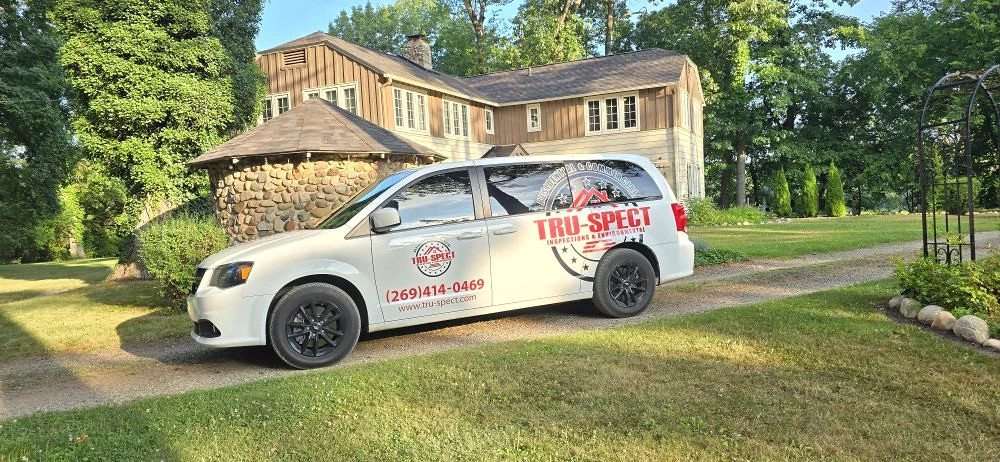
Tru-Spect service van with original company branding parked outside a home

Months of careful wording

A report template we wrote ourselves

Built in house, not borrowed

We created our own report template instead of relying on a stock checklist. The comment verbiage was written and refined over months upon months of drafting, field use, and revision.

Written for every kind of reader

The people we serve range from first time buyers to experienced investors, agents, contractors, and out of town owners. The wording is shaped for that variety of people so everyone can follow it.

Understandable without a construction background

Each comment explains the finding in everyday language, so you can understand what we observed, why it matters, and what to do next even if you know nothing about housing components.

The template is a starting point, not a rigid script. Your report is edited to describe the actual conditions observed at your property, and the inspection limitations still apply.

Powered by Spectora

Your report, easier to explore

Read it on your device

Spectora's published web reports work in desktop and mobile browsers without an app download, with PDF options for saving or printing (Spectora guidance).

Find what you need

Section navigation, summaries, and report filters help you move to the findings you want to discuss (Spectora guidance). Start with the overview, then read the full report.

See the context

Spectora supports photo annotations and video in inspection reports, helping connect the written finding to visual evidence (Spectora guidance). The actual content reflects what was documented during your inspection.

From observation to next step

Four questions a useful finding should answer

What is the issue?

The observed condition and its location, explained in straightforward language rather than an unexplained label.

Why is it an issue?

The significance of the observation, such as a safety concern, active damage, a maintenance need, or a condition that calls for further evaluation.

Who should address it?

The appropriate type of qualified contractor, specialist, or other professional to evaluate the finding and define the work.

How should it be addressed?

The recommended next step or general corrective approach, with further evaluation when the cause or full scope cannot be determined visually.

A clearer explanation

What that can look like in practice

Illustrative finding, not a report from your property

Leaking kitchen sink drain trap

What we observed
A sample description would identify visible leakage at the kitchen sink drain trap during operation and document its location and observed condition.
Why it matters
The description connects the observed leak to the need to stop water from continuing to wet the surrounding cabinet or materials.
Who and how
A qualified plumber should evaluate the connection and assembly, repair or replace the affected components as appropriate, and check operation after the work. The inspection is not a detailed plumbing repair design.
Budget context
A simple accessible connection repair and replacement of an unsuitable glued assembly can involve different scopes. A useful low to high range needs those assumptions, not just a single dollar amount.

For an example of one repair approach, This Old House demonstrates a plumber replacing a leaking glued PVC sink trap (This Old House repair video).

Watch the example sink trap repair on YouTube →

This is an independent educational demonstration, not a Tru-Spect repair quote or an instruction that this method fits your property. Your contractor must assess the actual condition and applicable requirements.

Understand the assumptions

Low to high estimates: context, not a promise

Where the finding supports meaningful budget guidance, our report can include a low to high repair cost range. It helps you understand possible scale and plan questions. It is not a contractor bid, fixed price, guarantee, or automatic seller credit amount.

Not every condition can be priced responsibly during a visual inspection. If the cause, extent, or required work is unknown, further evaluation and a written quote are more useful than a misleading number.

Scope and access

A minor repair, component replacement, and full system correction are different jobs. Working height, tight spaces, accessibility, and the need to open finished surfaces affect the scope.

Labor and materials

Local contractor availability, material selection, equipment, specialist qualifications, and project timing can change pricing.

What is not yet visible

Concealed damage, related repairs, permits, engineering, environmental precautions, and finishing work may add work beyond the initial visible finding.

Ask the contractor what their quote includes and excludes. Before using a repair amount for a purchase decision or deadline sensitive request, obtain the appropriate evaluation and written pricing for that property.

See the idea, understand the limits

Repair videos that make recommendations easier to picture

Selected report findings can include a clickable YouTube link showing the type of issue or repair being discussed. Seeing an example can help you understand unfamiliar terminology, visualize a possible correction, and ask a contractor more specific questions.

The link is educational context, not a promise that the same method fits every home. It does not replace diagnosis, a qualified contractor, permits, or safety precautions. Electrical, structural, roof access, and environmental hazard work should not be treated as a do it yourself project simply because a video is available.

Not every finding needs a video or a cost range. We use these additions where they help explain the recommendation. Your actual report and agreed scope determine the information provided.

A shared starting point

Help your agent turn findings into focused requests

After reading your full report, discuss the findings with your agent. Decide what needs clarification, a contractor evaluation, a repair request, or a requested credit before your transaction deadlines.

When enabled, Spectora’s Repair Request Builder allows you and your agent to select findings, add repair comments or manually entered requested credits, and share a focused list by URL or PDF (Spectora guidance).

The software does not choose your priorities, generate repair estimates, or negotiate for you. A credit you request is not the same thing as Tru-Spect’s preliminary cost guidance. Your agent prepares the required addendum or other contract documents and helps you follow the transaction process.

Watch the report to request workflow

See the workflow

From inspection findings to a focused repair request

Spectora's official agent and buyer tutorial demonstrates selecting report items, adding comments or requested credits, previewing the document, and sharing a link or PDF (Spectora video).

The video opens on YouTube. No player or app is needed on this page. Your live report's available tools and settings determine your workflow.

A simple way to review your report

  • Open the report link provided for your inspection. Start with the summary, then read the full descriptions, photos, and limitations.
  • Use the report's priority labels and recommendations to identify questions, rather than treating every observation as equally urgent.
  • Contact Tru-Spect for clarification about an inspection finding. Ask the recommended professional to define repair scope and final pricing.
  • Discuss transaction requests and deadlines with your agent. Share report information only with the people you choose to involve.
  • Keep a copy for future planning. Inspection day observations are useful context, not a guarantee of the property's future condition.

Your copy to keep

Save or print a PDF of your report

Spectora's published web report includes a PDF option, so you can save or print a copy without special software (Spectora guidance).

  1. Open your reportUse the report link from your email or the client portal. The web report opens in any browser.
  2. Click the PDF buttonOn the report's cover photo, click the blue PDF button in the lower right corner.
  3. Choose the versionSelect Summary for the condensed findings or Full Report for the complete document.
  4. Save or printUse your browser's download or print controls to keep your copy.

The web report remains available online, and the PDF is the copy you keep for your records, your agent, or your contractor conversations. If the PDF button is not available on your report, contact Tru-Spect for help.

Inspection report questions

How do I save a PDF of my report?

Open your web report, click the blue PDF button on the cover photo, and choose Summary or Full Report, then use your browser's download or print controls (Spectora guidance). The web report stays available online as well. If you need help, contact Tru-Spect.

Do I need an app to read my report?

Spectora's published web reports open in a desktop or mobile browser without a special app, with PDF options also available (Spectora guidance). Use the report link provided for your inspection. If access is not working, contact Tru-Spect rather than sharing private credentials.

Is the summary the entire inspection report?

No. The summary helps you start with the findings that need attention. Read the full report for the detailed descriptions, photographs, system information, limitations, and recommendations relevant to your inspection.

Will every finding have a firm repair price?

No. Low to high ranges, when provided, are preliminary budget guidance, not contractor bids. Some conditions need further evaluation or a defined repair scope before a useful estimate can be made. A contractor's written quote may differ because of access, materials, local labor, hidden conditions, permits, or related work.

Does the Repair Request Builder decide the amount we should ask for?

The Repair Request Builder does not generate repair cost estimates (Spectora guidance). You and your agent select the findings, add any requested credits or repair comments, and review the request (Spectora guidance). Your agent handles negotiation strategy, the required contract documents, and the transaction process.

Are the linked YouTube repair videos instructions for me to do the work?

No. They are educational examples to help you understand a possible repair and ask better questions. Your property may need a different method, professional qualifications, permits, or additional evaluation. Use the qualified professional recommended for the finding. A video is not a property specific repair plan.

Can my agent help me make a repair request list?

Yes. Share the appropriate report link with your agent. When the Repair Request Builder is enabled, you and your agent can select findings, add comments or requested credits, and create a focused request, with available portal access and settings varying (Spectora guidance). Contact Tru-Spect if you need help finding the tool.

Does the inspection tell me whether I should buy the house?

No. We explain observed conditions, their significance, and the recommended next step so you can decide with your agent and other advisers. The inspection is a visual evaluation of accessible areas, not a guarantee about concealed conditions, future performance, or every repair cost.
Reporting and repair video resources

These independent resources explain the software and example repair methods. Software options depend on report settings. External demonstrations do not replace your inspection findings, contractor evaluation, or transaction requirements.

  • Spectora: Web report features and examples

    Official software examples, not Tru-Spect customer reports. Explore browser based viewing, photos, video, and PDF options.

    View reference address

    https://www.spectora.com/sample-reports/

  • Spectora: How to download or print a report PDF

    Official steps for creating a summary or full report PDF from your published web report.

    View reference address

    https://support.spectora.com/en/articles/2065993-how-to-download-or-print-a-report-pdf

  • Spectora: Repair Request Builder instructions

    Learn how findings become a request list and why requested credits are not automatic repair estimates.

    View reference address

    https://support.spectora.com/en/articles/2155740-spectora-s-repair-request-builder

  • Spectora: Agent and buyer video tutorial

    A guided demonstration for buyers and their agents.

    View reference address

    https://www.youtube.com/watch?v=IiuAl1cm1Ok

  • This Old House: Replace a PVC sink trap

    An independent plumbing repair example used in the illustrative finding above, not a property specific repair plan.

    View reference address

    https://www.youtube.com/watch?v=HkFTnnFbh-s

Questions should lead to clearer answers

Ask about a finding, discuss an additional service, or request a sample Tru-Spect report through our office contact page.